 ClipVigil
The clipboard manager for Mac that guards your API keys.
Local, encrypted history. Secrets are redacted, kept out of search, and destroyed on a timer. ⌘K transforms for JSON, JWT and Base64.
14-day full trial, then free basic mode with every secret protection. Needs macOS 15 or later.
Illustration: a lighthouse sweeps its beam across dark water. Lines of copied text drift by. When the beam finds an API key, the middle of the key is hidden, a 30-second ring starts, and the line sinks.
Copy a key. Watch what the panel does.
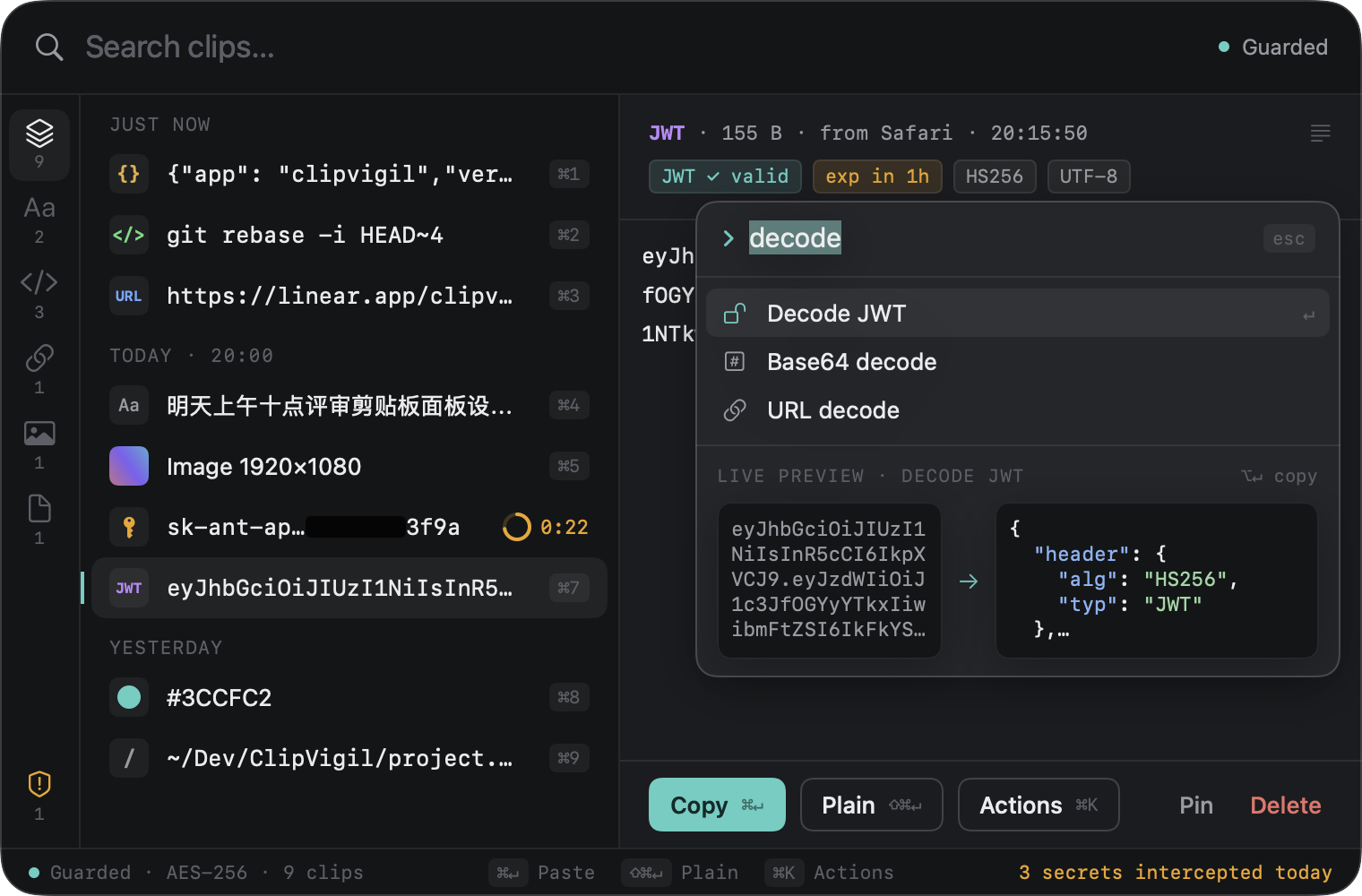
This is the real layout of the panel. Add a sample key, paste your own text, or press ⌘K on a clip.
Select the JSON clip and press ⌘K to format it. This demo runs in your browser. Nothing you paste leaves this page.
A copied secret has thirty seconds to live.
Copy an API key, a token, a JWT, a private key or a database URL with a password in it. ClipVigil recognises it on your Mac, blacks out the middle and starts a countdown. At zero the item is destroyed. Prefer no trace at all? Set secrets to not be recorded.
-
On copy
Detect
Built-in rules know AWS, GitHub, OpenAI, Anthropic, Stripe, Slack and Google keys, JWTs, private keys and database URLs with passwords. A plain UUID or a Git SHA is left alone.
-
On copy
Redact
The panel shows the prefix and the last four characters. The middle stays black until you reveal it with Touch ID, for 10 seconds.
-
Always
Keep out of search
Secrets are never written to the search index, and deleted rows are overwritten on disk.
-
After 30 seconds
Destroy
After 30 seconds by default, or not recorded at all. You choose in Settings.
Password managers: anything marked concealed or transient is skipped before ClipVigil reads its content.
Encrypted on disk. Invisible on a screen share.
Encrypted history. A SQLCipher database. The key is generated on your Mac and kept in your Keychain. Touch ID lock. Ask for Touch ID or your password before the panel opens, and lock again when you step away. No account, no cloud. No sign-in, no telemetry, no sync. The code that captures, stores and scans the clipboard has no networking in it.
Don’t take our word for it. Read the list.
From the app, only update checks and Pro license checks use the network. Neither carries clipboard content. Every request is documented, and a network monitor such as Little Snitch will agree.
Never over the network
- Clipboard contentText, images, files and secrets stay on your Mac.
- Search terms, history, source appsThey live in the encrypted local database only.
- Analytics and crash reportsThere is no such SDK in the app, and none on this site.
What does connect
| What | Network? | Detail |
|---|---|---|
| Update check (Sparkle) | optional | Fetches a signed version list. You can turn it off in Settings. |
| Pro license check | Pro only | License code, a one-way device hash and the app version. |
| Trial and basic mode | none | No license requests at all. |
Press ⌘K. Transform. Paste.
Select an item and transform it before it lands in your editor. You get a live preview, then ↵ pastes the result or ⌥↵ only copies it.
What ⌘K does
- Format or minify JSON
- Decode a JWT: header, payload, expiry
- Base64 and URL encode / decode
- Timestamps (seconds or ms) to ISO 8601 and back
- camelCase, snake_case, kebab-case
Pay once. Secrets stay protected either way.
Pro is $19.99, once: no subscription, 3 Macs, every 1.x update. Try everything free for 14 days first. After that, basic mode is free forever and every secret protection stays on.
Straight answers.
What is ClipVigil?
ClipVigil is a clipboard manager for Mac, built to keep secrets out of your history. It recognises API keys, tokens and private keys as you copy them, redacts them, keeps them out of search and destroys them after 30 seconds by default. Everything else stays searchable in a local, encrypted database.
Does ClipVigil send my clipboard to the cloud?
No. Clipboard content never leaves your Mac, and there is no account, sync or analytics. The app uses the network only for update checks, which you can turn off, and for Pro license checks. Trial and basic mode send no license requests. The privacy page lists every request.
How does ClipVigil detect API keys and tokens?
Built-in rules run locally on every copy and match known formats: AWS, GitHub, OpenAI, Anthropic, Stripe, Slack and Google keys, JWTs, private keys and database URLs with passwords. Plain UUIDs and Git commit SHAs are not flagged. A hit is redacted, then destroyed after 30 seconds by default, or not recorded at all.
Does it work with 1Password and other password managers?
Yes. Anything a password manager marks as concealed, transient or auto-generated is skipped before ClipVigil reads its content. 1Password, Bitwarden and Keychain Access are also on the default exclusion list, so whatever you copy from those apps is never recorded.
Is the ClipVigil panel visible in screen sharing?
No. The panel is excluded from screen recordings, screen sharing and screenshots, so a call or a recording never captures your clipboard history. Secrets also stay redacted on screen until you reveal one with Touch ID, for 10 seconds. You can open the panel normally while presenting.
Which macOS versions does ClipVigil support?
ClipVigil runs on macOS 15 Sequoia and later, and is tuned for macOS 27. The download is a DMG signed with a Developer ID and notarized by Apple. When macOS asks about reading the clipboard, choose Always Allow so ClipVigil can keep your history.
Does your clipboard history leak API keys? Pricing questions
More Mac apps from Quartz
Explore all Quartz apps-
 TuckHide the menu bar icons you rarely use.
-
 FacetFind and launch your Mac apps from a fullscreen grid.
-
 PeekMarkPreview Markdown in Quick Look and browse your local notes.
-
 DiskStewardFind what takes up space and review files before cleanup.
-
 ExitglassCheck your public IP and whether DNS, WebRTC or IPv6 leak around your VPN.
-
 LemviaTranslate selected text or capture text from your screen.
-
 StillbarCPU, memory and network speed in your menu bar.